.png?width=300&height=77&name=black-logo%20(1).png)
Set Specific Asset Types on Templates
Stronger asset selection controls on forms are here!
Admins can now define exactly which asset types appear on a form and whether workers must select one, or if asset selection is optional. This reduces noise in the field, speeds up submissions, and improves data quality across equipment-related workflows.
Learn more about how to set up or require specific asset selection on forms.
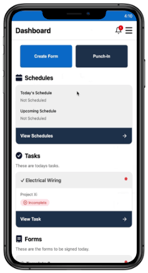
New Mobile App Updates: Top Quick Action Buttons
We've streamlined navigation and workflows in our mobile app even more!
See big, quick action buttons for punch in/out, time cards, and switching between projects and cost codes.
The result: better efficiency, fewer errors, and more time spent getting work done safely on site.
Payroll Enhancements
Streamlined Termination & Rehire Workflow
We've automated a lot of the downstream manual settings for terminating and rehiring a worker in Corfix Payroll. More efficient, less room for error.
See the following articles for a step by step on the termination/rehire process:
Year-End Tools
Year-end tax filing is officially open. To keep your filings on track, please plan to submit your T4, T4A, and RL-1 packages in Corfix by February 24. This gives enough buffer before the government deadline and helps avoid any last-minute issues.
We’ve prepared two short guides that walk through the process and outline a few important system behaviours to keep in mind:
Note: Corfix Payroll is currently available to customers located in Canada.
Additional Enhancements & Fixes
-
Forms:
- Fixed an issue preventing forms configured for auto-sending upon completion from being emailed to recipients if no signer was explicitly added.
- Resolved a bug on the "All Forms" page where the project filter did not correctly handle projects with duplicate names, now allowing users to filter for all relevant forms.
-
Mobile:
- Resolved an issue where filtering the Workers list, navigating to a worker's profile, and returning would break pagination, preventing users from scrolling past the first 10 workers. The list now displays all applicable workers correctly.
- Fixed a bug where scheduled forms on the mobile dashboard appeared with the old UI styling instead of the new updated design.
- Corrected an issue where using the "Copy Previous Form" option would incorrectly redirect users to the Projects list, even though the form data was copied. Users are now correctly taken to the pre-filled form content.
- Addressed a display bug on iOS where options within a select box modal in an edit grid were truncated and not fully visible. All options are now displayed as intended.
- Fixed an issue where clicking a modal select box during form editing would cause the modal to appear at the top of the screen instead of the current scroll position, requiring users to scroll up. The modal now appears contextually.
- Resolved a UI issue where text and icons in the mobile app's bottom menu bar were being cut off or improperly scaled, particularly when using larger text accessibility settings. The menu bar now displays correctly across different text sizes.
- Fixed an issue where the 9th entry in data grids was being cut off in generated PDFs and not correctly flowing to the next page.
- Fixed a display issue on iOS where select box modals within an Edit Grid were cut off, preventing users from viewing all available options. The modal now displays correctly.
- Resolved an issue where certification statuses, particularly "expiring soon" notifications, were displayed inconsistently between the mobile application and the admin portal. Mobile now accurately reflects the correct certification status.
- Fixed a bug on iOS where creating a form directly from the Assets screen did not populate essential dropdown lists (e.g., projects), preventing users from properly completing the form. Users can now seamlessly create forms from assets with all necessary fields populating correctly.
- PDFs:
- Resolved an issue where selected radio buttons in forms were not appearing as checked in the final generated PDFs.
- Fixed a bug where Edit Grid components were truncated and squished on the first page of PDFs when a company logo was present, ensuring all entries display correctly.
- Addressed an issue where selections made in form select boxes, particularly those with conditionals, were not appearing in the generated PDF reports.
- Corrected a problem where user inputs for survey components embedded within data grids were missing from generated form PDFs.
- Addressed an issue where photos uploaded within data grid components were stacking vertically instead of displaying side-by-side in generated PDFs, optimizing document length.
- Certifications:
- Improved the certification sorting function by status, ensuring "Approved," "Expired," and "Expiring Soon" categories are now correctly sorted instead of being mixed.
- Corrected a spelling error from "Administators to notify" to "Administrators to notify" in the Certifications settings.
-
Tasks:
- Improved the flow when attempting to complete a task without providing a note. The "Add task note" field is now optional, allowing users to complete tasks seamlessly, and only adding notes when they need to.
- Standardized date formats for task notes on the Admin's Tasks page to match the "Created at" and "Due date" formats.
- Timekeeping:
- Introduced a new export option for timekeeping data, allowing users to generate CSV files formatted specifically for ADP Run.
-
- Prevented users from creating timecards for workers without a defined pay rate. The system now disables the 'Add' button and displays a tooltip explaining why a timecard cannot be added without a pay rate.
- The worker's pay rate is now consistently displayed on their Worker Details page when the Time Card feature is enabled, matching the behavior when Punch Clock is active.
- Payroll:
-
Support has been added for net pay garnishments, enabling deductions to be calculated from an employee’s net pay rather than gross.
-
-
- TD1 amounts now automatically roll forward each year and are indexed in accordance with CRA guidelines.
-
You can now choose which earnings, allowances, and reimbursements are included when calculating percentage-based benefits and deductions. To do this, start by creating the benefit or deduction as you normally would. A new configuration section will display, allowing you to specify which income types should be included in the percentage-based calculation.
Coming Soon ...
Curious about what we're working on next? Here's just a taste of some of the functionality we have in the works! Be on the look out for the following in a future release:
Multi-Level Cost Codes
Deeper job costing accuracy and segmentation is coming soon! Cost codes will be able to support up to three levels and be assigned to specific projects to limit what workers can select from. Guide your workers automatically through selecting the appropriate top and sub-level work associated for better reporting and analysis.
Merge Certification Types
Admins will be able to merge duplicate or near-duplicate certification types into a single standardized record. Variations caused by human error can be consolidated, keeping certifications clean, searchable, and consistent across the platform.
No more hunting through certs that are “almost the same”.
Coming Soon to the Amazon App Store
The Corfix mobile app is coming to the Amazon Appstore, making it compatible with Fire tablets. This gives teams more flexibility in how they deploy Corfix on site, especially in shared or kiosk-style environments.
For the best overall experience, we continue to recommend iOS and Android devices.
Want to share your feedback? Reach out to the Corfix team -- we're always looking for feedback on how we can continue to improve!