
Introducing Corfix Vitals
See What Needs Attention the Moment You Log In
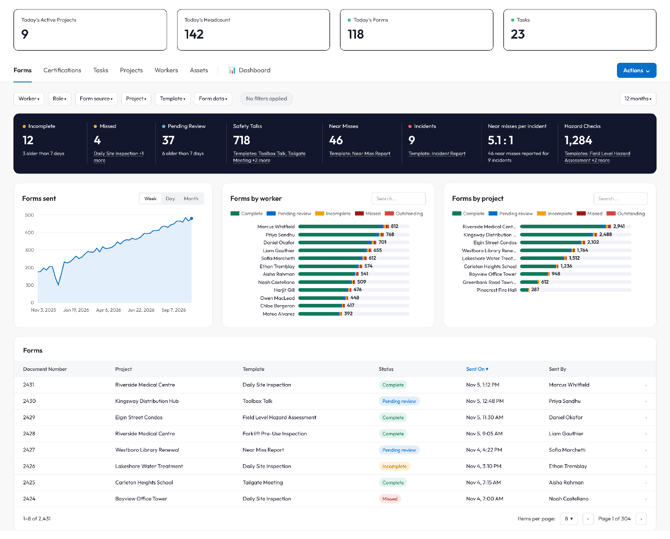
Corfix Vitals adds six new dashboards on your Dashboard page: Forms, Certifications, Tasks, Projects, Workers, and Assets. Together they're called Corfix Vitals, and they're built to help you see where to act this week. Each one takes the numbers your crews and admins already enter into Corfix and puts them in front of you, with one click from any number into the record behind it.
Tap a metric or chart legend to filter the whole tab, or click any count or row to open the records behind it. Narrow everything by worker, project, role, template or asset. You can also pick a favorite tab to land on, print in landscape, and see when each tab was last refreshed.
Learn more about Corfix Vitals here.
Shared Custom Dashboards and Reports
Build it once. Share with your team.
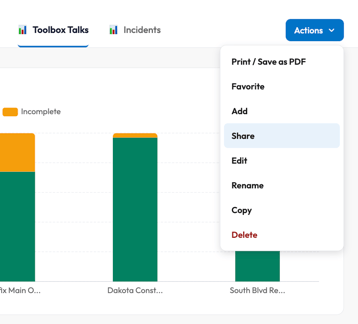
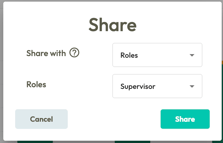 You can now share reports and custom dashboards with everyone in your company, with specific workers, or with specific roles. You can also keep them to yourself. Use “Share” from the Actions menu on a custom dashboard tab, or from the reports list. People you share a dashboard with can view it and copy it to make their own version.
Project managers and supervisors see what you see, without screenshots or exports.
Admins control who can share with the “Share reports” and “Share custom dashboards” permissions in Roles.
Know Who Hasn't Signed, Today
Catch missing signatures the same day, not during an audit.
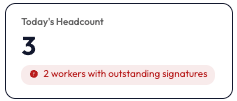 Your dashboard now compares the workers on site today, either punched in or scheduled, with the number who have not signed their documentation. For example, “2 workers with outstanding signatures.” Click it to open the Workers list, where the new “Today’s Signatures” column shows how many signatures each worker still owes for the day. Filter the list to workers with all of today’s documentation signed, workers with documentation outstanding, or workers with no required documentation today.
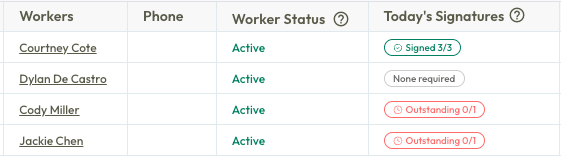
Supervisors now know exactly who to follow up with before the crew starts work, or leaves site.
The on-site comparison can use Punch Clock or Scheduling to show the difference between people on-site vs. people who signed.
Not using Timekeeping or Scheduling yet? Reach out to us to see what attendance-backed compliance looks like for your crews.
Scheduled Forms that Follow Attendance
Forms only on the days your crew is there.
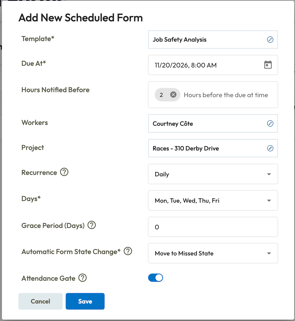
Turn on “Attendance Gate” when adding or editing a scheduled form, and Corfix only creates the form on days the worker is on that project. If you are using Punch Clock, that means days the worker punches in to the project, even if they punch in late. If you are using Scheduling, it means days they’re scheduled there. Days a worker isn’t on site create no form and never count as missed.
For workers, picking a project at punch-in shows the forms due for that project. They never see forms for sites they aren’t working.
Your missed forms reports show real gaps, not days off site.
NOTABLE UPDATES
Your Worker's Schedule, Even Without Service
Crews working in remote areas can be sure to show up at the right site without calling the office.
Workers and foremen can now view their schedule in the Corfix app with low or no connectivity. Schedules sync while online and show the project, crew, equipment, and notes for today and the days ahead. A “Schedule as of” timestamp shows when it last synced.
No signal underground or on a remote site? The schedule is still there.
Available to customers using Scheduling.
Less Tapping, More Doing in the Corfix App
Home, Forms, Tasks, Assets, and Certifications in the Corfix app now share one card design. Key details like project, status and due date sit right on the card, and the action a worker needs most is one tap away. Workers learn the layout once and use it everywhere.
When the next step is one tap away, forms and tasks get done instead of sitting in a list.
App Navigation Improvements
A "Back" navigation button has been added across every screen in the Corfix app, leaving a form saves your progress, and links open inside the app instead of a separate browser.
If you close the app mid-form, Corfix offers to resume it the next time you start one.
Page titles and buttons stay pinned at the top of long pages, and buttons are bigger and easier to tap. On iPhone, the keyboard no longer covers the field you’re typing in near the bottom of long forms.
Corfix also asks before discarding unsaved changes, and “Dashboard” in the app is now called “Home.”
A Faster Mobile App
The app starts quicker, and Home loads each section on its own, so one slow area no longer holds up the page. Large forms open and sign faster, and PDFs and certificates download faster, especially on older phones.
MINOR UPDATES & FIXES
Forms:
- Forms sent from a device after it reconnects no longer overwrite newer or signed versions of the same form. On shared devices, another user’s unsent forms no longer appear in the list.
- Forms no longer submit twice when a device reconnects.
- Signatures, dates, dropdown labels, conditional fields, required markers and tables now display correctly on mobile forms.
- AI form summaries are now written from the answers the worker recorded, skip answers that are names, and stay on the form when a draft is sent for signature. Very large forms still sign and send if the summary can’t be generated.
- Asset questions on forms now show only the assets in a worker’s groups. Previously workers could pick any company asset.
- Scheduled forms marked “Missed” now create a PDF when edited.
- Scheduled forms arrive every time. Previously, pausing on a form or saving it as a draft could skip the next scheduled form and its notification.
- A safeguard now protects a form’s saved answers from being wiped during a save.
- Forms that showed “The file you have requested has been moved or cannot be found” now generate their PDF.
- Day fields inside data grids now print on the PDF with each row’s date. Previously they printed blank.
- External forms keep the signer’s name in the title after they’re marked Reviewed.
- The public signing page now works in browsers that block cookies, such as iPhone Safari with “Block All Cookies” on.
- No more duplicate attachment uploads when someone taps Submit twice.
- Forms retry automatically after a dropped connection instead of failing to open.
- Fixed crashes when clearing an address field or removing a row from a repeating table.
- The Recents list in the project picker now shows only active projects, so new forms can’t be started on completed jobs.
- Large COR audits no longer get stuck on “Generating zip”, and a failed download now shows an error.
Mobile:
- Corfix QR codes for binders, files, external forms and public form links now open in the app. Previously the in-app scanner rejected them.
- Punching in with outstanding forms no longer crashes or freezes the app.
- Timecard saves and punching in or out no longer get stuck on a loading screen.
- Fixed startup and blank-screen issues on Android, and an issue that kept the app from opening on iOS 17.
- Companies with large template libraries get a steadier app start, and forms no longer open blank on a weak signal.
- Offline projects now appear when no distance limit is set.
- Certification files and form attachments load more reliably.
- Denying camera, photo or location access now offers an “Open Settings” option.
- Fewer surprise sign-outs. A brief network hiccup no longer sends workers back to the login screen.
- Login errors now show a more detailed reason instead of “Access denied.”
- Location tracking no longer shows duplicate permission pop-ups or gets stuck uploading.
- Offline status is now a small cloud icon in the header instead of a banner covering page buttons.
- Asset form buttons only appear when the worker can use them.
Kiosk:
-
After signing forms at punch-in, the Kiosk now returns to the right worker and project.
- The Kiosk now makes it clear that punching in requires an internet connection.
Tasks:
-
- The Tasks list in the app keeps loading as you scroll. Previously it stopped at 10 tasks.
- Tasks created from forms now appear on Home in the app.
- The task status dropdown on web is no longer cut off.
- Creating a task at the end of a form no longer risks a duplicate.
- Notes added from the Notes button on a task card now notify the task’s assignees and creator.
Workers:
- Worker imports now change only the columns you fill in. Previously blank columns could wipe saved details, and one bad row could freeze the import.
- Admins can now correct the email of a worker who is Pending Email Verification, and the invitation goes to the new address.
- The Kiosk PIN column in the worker report now shows the PIN the Kiosk accepts.
Projects:
- Editing a project with many contacts no longer freezes the page.
Timekeeping:
- Clicking quickly through Timecards pages now shows the page you selected.
Binders:
- Offline binders show as saved right away after turning on Offline Mode from the Binders page.
- PDFs up to 300 MB upload without crashing the browser tab.
Scheduling:
- The date picker on iPhone no longer opens with no dates showing.
- Workers whose role can’t view Scheduling no longer get schedule notifications, including the nightly reminder.
- Deleting a project removes its events from the schedule. Deleting a worker removes them from future events and keeps past ones.
Reports:
- Form Data reports now prompt you to “Populate Data” after you change selections, so the table never shows stale results.
Platform:
- Large data pulls are more reliable and no longer slow Corfix down for other users.
- Pages no longer fail to open after long use in the same browser.
- The API key “Copy” button no longer says “Copied!” when the browser blocked the copy. You’ll now see a message to copy it by hand.
- The dashboard, task list, multi-signer forms and punching out several workers all load faster.
- Browsers no longer autofill the password-reset code with an email or the new-password box with an old password.
Coming Soon ...
Curious about what we're working on next? Here's a taste of some of the functionality we have in the works! Be on the look out for the following in a future release:
Offline Timekeeping
Reliable time tracking, even without service.
Allow workers to punch in and out, switch cost codes and jobs, without any internet or data connection. Automatic data sync once the device reconnects, with reliability crews can depend on while working remote or underground.
Bulletins
A direct line from head office to the crew. Send project kickoffs, event announcements and safety alerts in Corfix. Target everyone or specific groups, pin what matters, and see who has read it.
Corfix MCP Server
Connect the AI assistant your team already uses to your Corfix data, and ask about your forms, tasks, certifications and more in plain language. It reads your data and never changes it.
More Quick Actions in the Mobile App
The card design from Home, Forms, Tasks, Assets and Certifications is coming to Timecards, Projects and Workers. Key details up front and one-tap actions on every screen.
Schedule by Worker View
See every worker’s week across every project. Each row is one worker, so open days stand out and free capacity is easy to spot. Drag a project onto a worker’s day to book them, with conflict and certification warnings applied.
Want to share your feedback? Reach out to the Corfix team -- we're always looking for feedback on how we can continue to improve!