.png?width=300&height=77&name=black-logo%20(1).png)
Build Templates in Seconds with Corfix Assist (Beta)
Upload the paper form. Review the draft. Done.
You can now upload a PDF, JPG or PNG of an existing form, and Corfix Assist turns it into a draft template you can review, edit and save. Use “Build with Corfix Assist AI” in the Template Builder for a single file, or upload up to 10 files at once from the Templates page.

Drafts appear as “Corfix Assist Generated” so you can find them fast. Once saved, they work like any other template: export, copy, download and view the PDF.
Move off paper or a legacy system without rebuilding every form field by field. Your crews get digital versions of the forms they know, sooner.
You can generate up to 50 templates per month.
Know what forms get missed -- and say goodbye to stale forms.
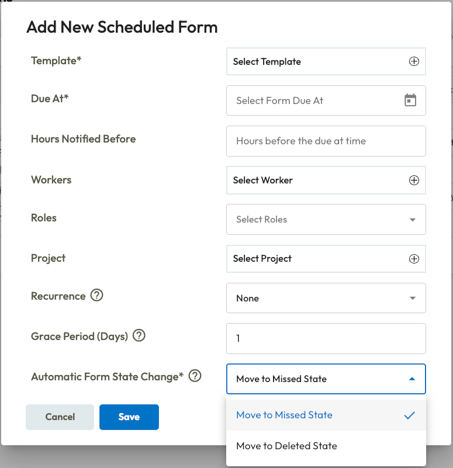
Set a grace period. Stale forms clean themselves up.
Scheduled forms now support a grace period, set in days for each form. When a form passes its grace period without being started, you choose what happens: mark it “Missed” or delete it automatically. Filter and report on missed forms in Corfix Reports to see who owned each form, which project it was for, and which day.
For field workers, missed forms drop off their list on their own. Workers never see missed forms in the app, so their list shows only what still needs doing.
No more guessing at compliance. No more manual clean-up.
To set it up, apply these settings by creating or editing your Scheduled Forms from the All Forms page:
Get the Whole Crew as Form Signers
The right signatures, in one click.
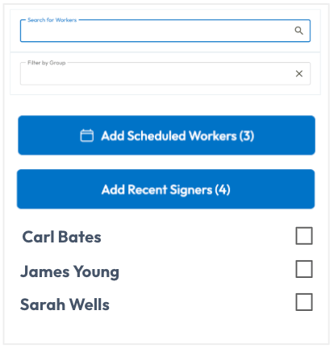
When filling out a form, use “Add Punched In Workers” or “Add Scheduled Workers” to the signer list in one click instead of picking names one by one.
Foremen get the full crew to sign the form fast, and no one on site gets missed.
Adding Punched In Workers requires Punch Clock set up in Timekeeping. Adding Scheduled Workers requires Scheduling.
NOTABLE UPDATES
Find Assets by Number
Search by number, select with confidence.
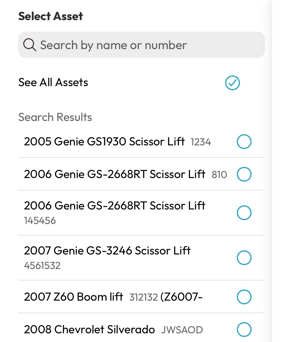
Asset selections support searching by asset number alongside asset name, with the number displayed next to each asset in the list.
Workers can pinpoint the exact piece of equipment, for accuracy on every submission.
Set Up Scheduled Forms right from the Project
We've added a new area for Scheduled Forms to be configured from the Project details page. Admins can now see, add, and edit a project’s scheduled forms without ever leaving the project.
Close Out Tasks & Resolution Forms in One Flow
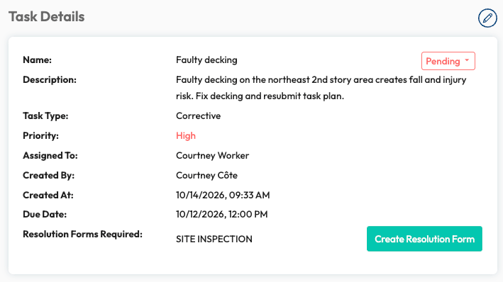
A task’s details now list its “Resolution Forms Required” front and center. Create each form in one click with the template and project already filled in. After signing or sending for signature, you land back on the task. Available now on web and mobile.
Faster close-out with paperwork done right.
Pinch to Zoom on Mobile PDFs
Workers can pinch or double-tap to zoom on PDFs in the Corfix app. Small print on drawings and attached documents is now easy to read in the field.
Filters that stay put on Mobile
Filters on Forms, Tasks, Time, Projects, Assets, Certifications and Scheduling no longer reset when a worker switches tabs and comes back. The filter button now reads “Apply.”
A Cleaner Forms Page on Mobile
Form cards on the “Forms” page in the Corfix app have a cleaner, more consistent design. Each card now has a quick action button that changes based on the form’s status, such as opening a draft or signing, so workers can act on a form in one tap. Update to the latest version of the Corfix app to see the new cards.
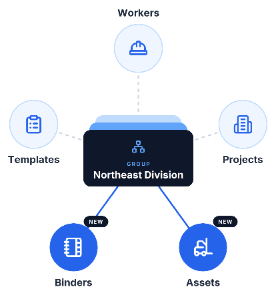
Group Structure, Everywhere
When you need to organize your whole company by division, region, or team -- our latest updates to Groups can help.
Groups now also supports segmentation of assets and binders, joining workers, templates, and projects. Set up your divisions or regions once and apply the same groups across every record.
The result: each team works from its own people, projects, equipment, and documents, without the noise from the rest of the company.
MINOR UPDATES & FIXES
Forms:
- Signing, editing or submitting a public form no longer shows an error in some caseswhen the form actually saved.
- On a weak connection, a form’s template could fail to load without warning, and workers could still sign a blank form. The app now waits for the template to load, and tapping the template again retries.
- “Send for Signature” now highlights the fields that need fixing. The same improvement applies when editing, signing and on public and external signing pages.
- Survey questions keep their answers without flickering, saved addresses reopen easily, and incomplete task triggers no longer cause errors.
- Signature fields that allow more than one signature no longer show a broken preview image.
- AI form summaries no longer go missing during service interruptions. Corfix now retries and populates AI form summaries automatically.
Mobile:
- Fixed crashes on punch-in and punch-out, when a punch question was missing, and when swiping while a PDF was open. Older Android phones that crashed on launch are stable again.
- Fixed app crashing issues for mobile users with many offline forms.
- Users with many offline forms can open the app again. Previously, some saw “Local storage could not be prepared” or were signed out.
- Choosing to discard form changes now sticks, so workers no longer see repeated warnings.
- Improved reliability when copying previous forms, selecting assets, adding attachments, saving forms, viewing PDFs, loading photos, using chat, viewing timecard settings and resetting passwords. Cost code selections are now kept when the picker is closed.
- After a password reset in the app, workers now return to the login screen to sign in with their new password.
PDFs:
-
- Resolved an issue where some long answers in text fields now wrap instead of running off the page.
- Two-column sections and headings print as designed. Some PDFs are much shorter as a result.
- Pass and fail highlights in repeating tables now show on every row, not just the first.
- Fields with many selected workers now print every name. Previously, names that didn’t fit on one line were truncated.
Projects:
-
The “New Project” form now opens blank. Previously, it could be pre-filled with the last project’s details until the page was reloaded.
- Project Details now loads when a contractor contact has no auto-emailed templates. Previously, the page didn’t load.
Timekeeping:
- More payroll detail in timecard reports: Timecard reports can now include Employee Number, Project Number and Cost Code Description columns, so payroll exports carry the identifiers your payroll team needs.
- Entering 0 for “Auto Punch Out Threshold Hours” now turns auto punch-out off, as intended.
- Location trails no longer drop points late in a shift. Previously, points could stop recording after about four hours.
- Fixed an issue where editing a Punch Clock timecard in some cases would show an error.
- “Include Pay Rate” on the By Worker PDF export now adds the Pay Rate and Cost columns.
- The selected date range on Timecards now shows in full.
Notifications:
- Form reminders now go only to people who still need to sign. Forms with no assigned signers still remind the person who filled them in.
Scheduling:
- Fixed an issue where editing a later event in a recurring series and choosing “this and all following events” could show an error.
- Workers are now notified when a schedule card is moved on or off today, or tomorrow after the evening cutoff.
Platform:
- The “Reset Now” link in password reset emails now opens the reset page for every user. Previously, mobile-only workers landed on an app store page.
- Password reset errors now say what went wrong: wrong code, expired code, or locked out for 15 minutes.
- Clicking “Send Verification Code” more than once no longer sends multiple codes.
- Users who sign in with a username instead of an email now get password reset emails with their company’s branding.
- Users who belong to many companies see fewer sign-in errors.
- Users with no saved dashboards now see the four report tiles on a clean dashboard.
- External Signature license counts now show on My Account for companies without Timekeeping.
- Icons across the web app display again, including form revision, table and filter icons.
- Expired or invalid public form, project note and signing links now show a clear message instead of a blank page.
- Public links, QR codes and e-signing links now use a hardened secure format. Existing links and QR codes continue working.
- Long values with no spaces, like long project names, now wrap inside table cells, so the table and its row actions stay on screen.
- Pages no longer hang and show an error after a browser tab sits idle for long periods of time.
Coming Soon ...
Curious about what we're working on next? Here's a taste of some of the functionality we have in the works! Be on the look out for the following in a future release:
Forms That Follow Your Crew
For clients using Scheduling or Punch Clock, a new setting for scheduled forms will allow you to generate forms only when a worker is on the project, even if they punch in late. Add all Punched In Workers or Scheduled Workers as signers in one click, and manage a project’s scheduled forms right from the project details. It runs on Punch Clock or Scheduling automatically, based on the modules you use.
Know Who Hasn't Signed at a Glance
Just like how you can see documentation status on the Projects page, you can now see the same information at the Worker level.
A new Daily Forms Complete column is being added to the Workers page to show every worker's documentation as as Complete or Incomplete for the day. Sort and filter to find the gaps, then follow up with the right worker directly. Catch missing signatures the same day, not during an audit.
New Dashboards
We're adding extra visibility to Corfix, without the extra spreadsheets. Keep an eye out for ready-made dashboards for Forms, Tasks, Certifications, Projects, Workers, + Assets.
Tap a metric to filter the whole dashboard or click any row straight through to the record.
Built on the data + modules you already have.
Quick Actions Across the Corfix Mobile App
The card design and quick action buttons from the Forms page are coming to other areas of the Corfix app. Cards will look and work the same way everywhere, with one-tap access to the actions workers and foremen use most.
Offline Timekeeping
Reliable time tracking, even without service.
Allow workers to punch in and out, switch cost codes and jobs, without any internet or data connection. Automatic data sync once the device reconnects, with reliability crews can depend on while working remote or underground.
Offline Schedule
Workers and foremen will be able to view their schedule in the Corfix app with low or no connectivity. Schedules sync while online, showing project, crew and equipment for today and the days ahead. A “Schedule as of” timestamp shows when it last synced. Crews show up at the right site without calling the office.
Crews show up at the right site, ready to work, without calling the office.
Want to share your feedback? Reach out to the Corfix team -- we're always looking for feedback on how we can continue to improve!