.png?width=300&height=77&name=black-logo%20(1).png)
Required Task Fields
Stop chasing missing photos and notes on tasks.
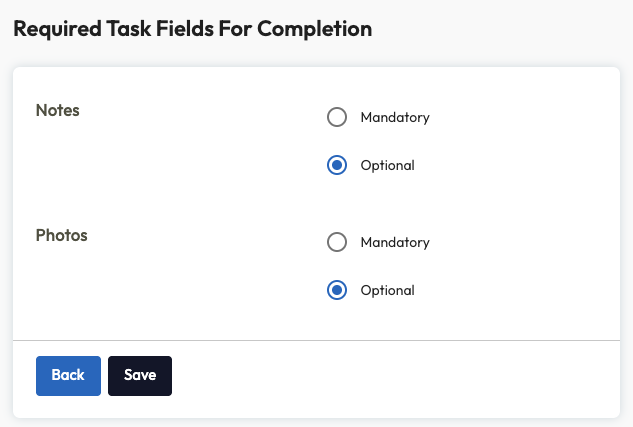
Admins now have the option to mark task fields like Notes and Photos as Mandatory or Optional. Once set, a task can't move to Completed until every mandatory field is filled in.
To configure this setting from the Tasks page in Admin, navigate to "Task Settings" at the top of the page.

From there, you can specify if Notes and/or Photos should be Optional or Mandatory when moving a task to a completed state.
No more manual audits or follow-up messages to get missing compliance data.
Two Alerts, Less Noise
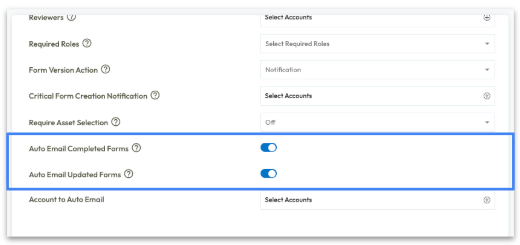
Set emails just for form completion, form updates, or both.
In this release, we've added more configurability to template settings: "Auto Email Completed Forms" enables an email to be sent to the specified users only for the initial email when a form is complete. For further notifications, an "Auto Email Updated Forms" email can also be optionally enabled which will send subsequent email notifications when a form is edited afterward, like a task being added.
Turn off the noise from routine post-submission edits without losing your initial completed form notifications.
Coming Soon ...
Curious about what we're working on next? Here's a taste of some of the functionality we have in the works! Be on the look out for the following in a future release:
Build AI-Powered Templates with Corfix Assist
Our beta for new AI-powered digital templates are coming soon to help you create your templates in seconds.
Upload a document of an existing template and let us do the heavy lifting. Instead of building templates from scratch, just review and edit what's been auto-generated.
Perfect for onboarding from paper or migrating from legacy systems without all the extra manual data entry.
Know what gets missed -- and say goodbye to stale forms.
Corfix will give you the option to identify every form that didn't get filled out, but should have -- who owned it, which site, and which day. No more guessing, and no more manual clean up.
Admins will be able to set new configurations to scheduled forms, including:
- Set an optional "grace period" (in days) per form
- Choose what happens when a scheduled form passes the grace period: move to a new "missed" status or auto-delete
- Filter and report on missed forms in Corfix Reports
- See exactly who is and isn't compliant on scheduled forms
Find Assets by Number
Search by number, select with confidence.
Asset selections support searching by asset number alongside asset name, with the number displayed next to each asset in the list.
Workers can pinpoint the exact piece of equipment, for accuracy on every submission.
Offline Timekeeping
Reliable time tracking, even without service.
Allow workers to punch in and out, switch cost codes and jobs, without any internet or data connection. Automatic data sync once the device reconnects, with reliability crews can depend on while working remote or underground.
Additional Enhancements & Fixes in this Release
Forms:
- Two people creating forms from the same template no longer have to wait for each other, and form creation is no longer rejected under heavy load.
- Fixed an issue where re-issued external signing links failed to open. If a signing link was re-sent to an external signer who already had one, the new link came back with "The signer is not included in the list of signers of the form" and only the original link still worked. Re-issued links now open the form correctly.
- For companies that number documents per template, changing a draft form's template kept the old template's number, so the new template's sequence never advanced and later forms collided with or skipped past numbers. The number is now re-issued from the correct template's sequence when the form moves.
- Fixed an issue where closing the form revision-compare window could leave the whole app invisible to screen readers until reload.
- The subtrade dropdown on the public sign form could silently show only "Other" for some companies. It now loads correctly and reports errors instead of hiding them.
- The external signing request could occasionally hang indefinitely with no error. Every step is now time-limited so the signer always gets a response.
- External signers who hit a slow submit saw only a spinner, and resubmitting could create a duplicate signed record. They now see a clear "this may take up to a minute" message and the button locks after one click.
- The QR code asset picker could briefly list every asset on the project instead of only the types the template allows. It now waits for the template's rules to load.
- On slow connections, the Forms list could show unfiltered results while your filter still appeared applied. Results now always match the filter.
- Clicking Save in the Template Builder before the page finished loading could silently discard the template name you typed. Save is now disabled until the page is ready.
- Resolved an issue where form data could be lost if an autosave occurred immediately after saving a draft or preparing a form for signature.
- When creating a new form, the "Template" field, which is required, was not visually highlighted as a mandatory field when left empty. This made it difficult for users to identify all missing information. This has been corrected, and the "Template" field now properly indicates it is required.
Mobile:
- Fixed an issue with missing assets in the form asset picker. When a worker's device had to catch up on a large number of assets at once, the whole catch-up request could fail, so some assets simply never appeared in the asset dropdown while filling out a form. The app now fetches them in smaller batches, so those assets download and show up.
- On the Scheduling calendar, tapping Today moved the highlight but didn't actually bring the calendar back to the current month or refresh the schedule shown. It now jumps to today and updates the view.
- When changing the app language on mobile, the success notification incorrectly displayed in the previous language, although the rest of the UI updated correctly.
- Addressed a UI issue on the mobile app where the signers selection interface for forms lacked proper padding, resulting in a cluttered appearance.
- Fixed a problem with the QR scanner on Android mobile devices where the camera feed would not display, appearing as a blank screen, even though the scanning functionality still worked. The camera feed now properly displays when using the QR scanner.
- Worker statuses (e.g., "Activated", "Blocked") on the Workers list in the mobile app are now correctly translated into French and Spanish, aligning with the user's selected language.
Platform:
- A faster API under load. You will notice we've removed a delay in front of file uploads, PDFs and anything else that touches storage.
- The footer strip under list tables sat too tall, hiding the last row's bottom border. Restored to its previous look.
- Updated most of the Admin app's form fields, dropdowns, buttons, tabs, and pop-up notifications to support the most current version of our UI framework.
- Restored the blue focus highlight on form fields so keyboard users can see which field they're in.
- Fixed an issue where a worker account edited within a second of being created could have that edit silently lost. Updates now always apply.
- A network blip during sign-in was reported as "Invalid Credentials", sending users to retype their password. Login now retries automatically and shows an accurate message if it still fails.
- For users who belong to multiple companies, the "Select Company" list was squashed side by side. It's back to one company per row.
Projects:
-
Fixed an issue with photos missing from some project galleries. The gallery now pages through photos in the same order it displays them, so backdated, imported or copied forms no longer hide items behind them.
PDFs:
-
- Resolved blank pages in a form's PDF. When someone pasted formatted content copied out of a web page or document into a form's text area, the finished PDF came out with blank pages in front of the content. Long text blocks now break across pages instead of being pushed off the page.
- Certain forms failed to generate PDFs, displaying an error message related to "tuple index out of range." This occurred because of a specific interaction between the form's layout and the PDF generation when forms were long enough to span multiple pages. We've implemented a fix to correctly generate PDFs for these forms, ensuring all form-related processes can proceed as expected.
Timekeeping:
- Kiosk-mode punch-ins now respect your existing geofence settings, so workers can only clock in within the defined radius of the job site. It reuses the same company radius, per-project exceptions, and block-vs-flag behaviour already in place for regular punch-ins — no new configuration needed.
- The By Worker Timekeeping PDF export now has an optional "Include Pay Rate" checkbox that adds each entry's pay rate, computed cost, and a worker-level total. It's off by default, so existing exports are unchanged.
- When exporting Timecards "By Worker" to PDF with notes, the export was incorrectly formatted in portrait orientation instead of landscape. This caused parts of the table, including the "End Time" and "Total" columns, to be cut off. This has been fixed to ensure all columns are visible in the landscape PDF export.
-
Resolved an issue for some projects with a custom geofence radius ("radius exception" projects), distance from the site was being measured inaccurately, so on-site workers could be wrongly blocked in some cases while far-away workers could potentially get through.
- Text typed into the Timecards worker filter while the page was still loading was silently ignored. It now takes effect regardless of timing.
- The notes text area on the Timecards edit page no longer automatically expanded to show all entered text, forcing users to manually resize it. This has been fixed, and the notes field will now automatically adjust to fit its content.
Notifications:
- Resolved multiple issues with mobile notifications, including incorrect badge counts and broken pagination.
- The notification bell on the Scheduling page was not correctly showing new or unread notifications. It didn't update when the page loaded or when new notifications arrived. This issue has been resolved, and the notification bell now accurately reflects the unread status.
- Corrected an issue on Corfix Mobile for Android devices where the system notification bar was hidden on Android 15 or lower. The notification bar is now consistently visible across all supported Android versions.
Scheduling:
- The Scheduling view was doing redundant work that grew with the number of projects and events, taking 4–5 seconds under load. Same results, dramatically faster.
- The Worker Bench in the Scheduling module was incorrectly showing workers who were in a "Pending Activation" status. While these workers couldn't be formally assigned through other means, their presence in the bench created confusion and the potential for incorrect scheduling. This has been corrected, and only active workers will now appear in the Worker Bench.
Certifications:
- Certifications "Export as Link" is faster and shows progress. Generating a shareable certifications link used to take around 10 seconds with no feedback, and showed nothing at all if it failed. It now returns in under a second, shows a busy state while working, and displays a clear error if something goes wrong.
Want to share your feedback? Reach out to the Corfix team -- we're always looking for feedback on how we can continue to improve!