.png?width=300&height=77&name=black-logo%20(1).png)
1-Click Task Management
Now you can take action on tasks, without the extra steps.
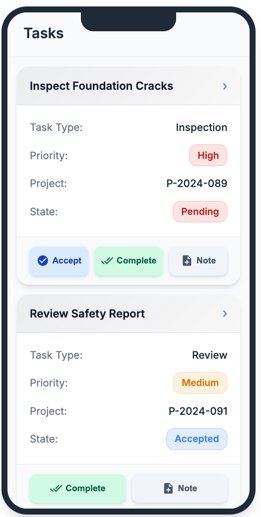
With our latest mobile release, workers can accept tasks, mark them complete, and add notes directly from the task list with prominent quick action buttons.
No need to open individual tasks, scroll, or navigate through multiple fields. Spend less time looking around, and more time getting work done.
More Integrations Available with Corfix Connect
Imagine having one source of truth across your systems -- total sync of your data.
You can now sync Corfix data seamlessly to even more platforms. This includes HR, payroll, ERP, LMS, compliance and reporting tools, making Corfix the central nervous system for your business.

New integrations added include:
- Procore
- CMiC
- Folks HR
- Salesforce
- Microsoft Sharepoint
- Microsoft Excel
- Quickbooks Online
- Classmarker LMS
- Google Sheets
- and more!
Learn more about Corfix Connect here, and reach out to your CSM to see what we can automate for you!
Configurable Notifications for Scheduled Forms
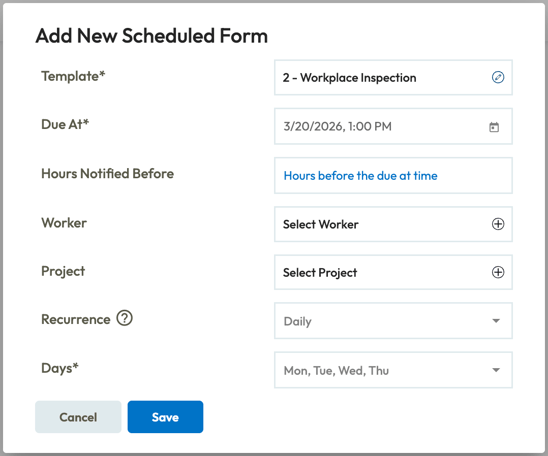
Send form reminders on your preferred schedule.
Now you can choose when reminders go out to workers with scheduled forms and set up recurring notifications that best match your team's workflow. Scheduled forms are created automatically on the due date if they haven't been filled out yet, keeping your compliance and documentation on track.
Additional Enhancements & Fixes
-
Forms:
- Resolved an issue where survey fields in equipment inspection forms appeared blank when downloaded, despite being filled out.
- Addressed an issue where regenerating a form that included a signed binder resource would omit the resource content if the original binder resource had been deleted. Forms now correctly retain associated resources even after deletion of the original.
- Corrected an issue where the "Duplicate" button for scheduled forms failed, preventing the creation of new scheduled forms.
- Resolved an issue where form Date/Time fields automatically shifted to the editor's local time zone upon editing, and downloaded PDFs lacked time zone suffixes. Forms now preserve the original submission time zone for accuracy and compliance.
- Improved the loading performance of the Scheduled Forms page, addressing slowness experienced by users with a high volume of scheduled forms, particularly those utilizing large templates.
- Resolved an error preventing the viewing or downloading of forms if their associated project lacked a project number, ensuring form accessibility regardless of project number status.
- Addressed a permissions issue where internal users with group-locked access could not view external forms submitted to their designated groups via QR codes.
- Resolved an issue in the Admin panel where dropdown lists for automated task creation within templates incorrectly displayed "[object Object]" as an option.
-
Projects:
- Fixed an issue where the 'Download' button for photos in the Project Photo Gallery did not work; photos can now be downloaded directly.
- Photos from private forms are appropriately restricted from the Project Photo Gallery.
-
Notifications:
- Resolved an issue where users configured to auto-receive completed forms would get duplicate emails when a form requiring final review was marked as reviewed/complete.
- Fixed an issue where custom logos configured for branding were not appearing in welcome emails sent to new workers.
Mobile:
- Fixed a display bug in the mobile app's "Upcoming Schedule" which incorrectly showed dates as one month ahead (e.g., May 1st instead of April 1st).
- Reports:
- Fixed an issue where Phone Number and Email components in forms could not be included in Form Data Reports.
- PDFs:
-
- Corrected an issue where images in generated form PDFs were not rendered according to the specified template settings (e.g., display size), appearing much smaller than intended.
- Resolved an issue in form PDFs where text and images would overlap, and columns would stack incorrectly, leading to poor formatting and unnecessary page breaks.
- Fixed an issue where page breaks in form PDFs could separate component labels (e.g., Grouping Legend, Photo Label) from their corresponding values, ensuring labels always appear with their content.
- Improved the clarity of images in generated form PDFs by optimizing image quality during the PDF generation process, making photos appear with clearer detail when zoomed.
- Fixed a problem where custom CSS classes, particularly those applied to data grids (e.g., to remove borders), were being stripped during PDF generation, resulting in different styling in the PDF compared to the web view.
- Fixed a rendering issue in form PDFs where survey component answers would not display if their values lacked labels or if multiple labels were identical/too similar.
- Certifications
- Fixed an issue where exporting multiple certifications as a link would cause the entire link to break if any single certification within that export was later deleted.
- Integrations:
- Fixed a 500 Internal Server Error encountered during Dropbox integration setup.
- Timekeeping:
-
- Introduced the ability to assign project cost codes directly from the Cost Code Edit Modal using a multi-select project field, streamlining the association process.
- Enhanced the "Default" timecard export where Cost Code values were duplicating on overtime (OT) lines. Cost codes now appear only on regular time (RT) lines.
- Ensured that the "Hours" field in the ADP Run export now complies with the `[11.2]` length criteria, correctly rounding hours to a maximum of two decimal places
Coming Soon ...
Curious about what we're working on next? Here's just a taste of some of the functionality we have in the works! Be on the look out for the following in a future release:
Multiple Pay Rates
Track time accurately, even when workers wear multiple hats.
Workers can be assigned several pay rates based on the roles they perform. When clocking in or creating a timecard, workers will be able to select which rate is applicable for that shift.
This ensures time is tracked and paid for the appropriate type of work, making timekeeping records and compensation accurate without extra manual adjustments.
AI-Powered Form Summaries with Corfix Assist
Corfix Assist can generate AI-powered summaries at the top of each completed form and in completed form emails. Get the key details without scrolling through every field.
Instead of piecing together what a form covers, leverage Corfix Assist for an instant summary covering what matters most, saving time for everyone who reviews forms.
Richer Task Automation
Set up tasks completely, right from the template — no extra config required.
Templates will be able to support additional configuration options for automated tasks, including description, notes, resolution forms, and due dates. Due dates will be set as a number of days after task creation, calculated automatically when the form is submitted.
Speed up task resolution by eliminating the extra steps in between.
Want to share your feedback? Reach out to the Corfix team -- we're always looking for feedback on how we can continue to improve!