.png?width=300&height=77&name=black-logo%20(1).png)
Scheduling: Worker & Asset Bench
Get the right resource, on the right job -- fast.
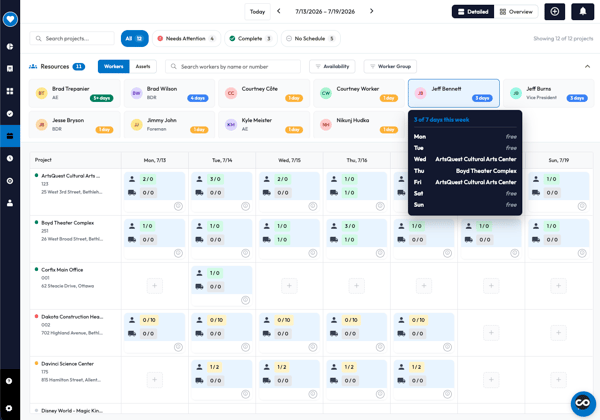
The Worker & Asset Bench surfaces your full roster of workers and assets directly at the top of the schedule's detailed view. Search and filter between workers and assets to find what you're looking for quickly. Hover on a worker to get a glance at their schedule for the week. When you've found the right fit, drag and drop them onto any project card to assign them for that day.
Schedule Overview
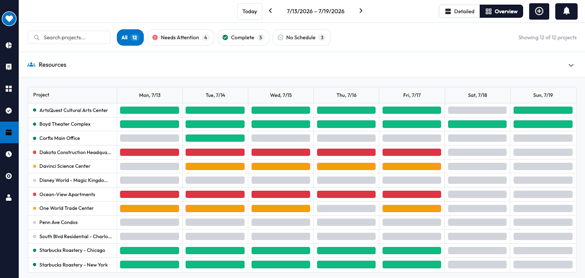
Understand the status of your schedules across hundreds of projects, in a glance.
Toggle to Overview from the top of Scheduling to see color-coded schedule blocks for every project, every day of the week. Hover for worker/asset coverage, click to jump straight into Detailed view and make changes.
Green status means your schedule has a full allocation of the resources needed for the project. Orange status means a partial schedule is allocated. Red status means no resources have been allocated to the project's schedule.
Asset Numbers & Descriptions
Find the assets you need, fast.
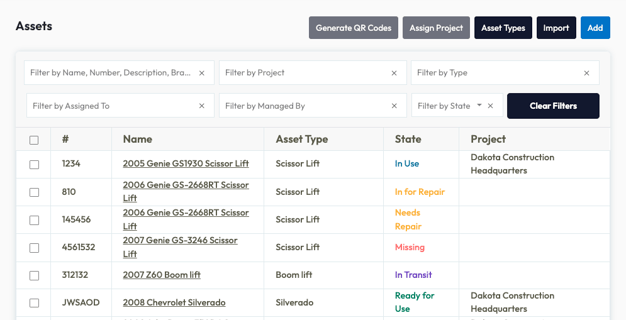
Admins can assign a dedicated Asset Number and Description to any asset, keeping identification separate from the asset name.
Assets are searchable by number, name, description, and more. Asset numbers now appear as a dedicated column in the asset list.
Mobile Form Review
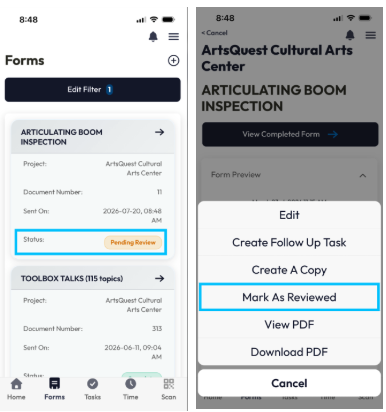
View forms that are Pending Review directly in from the mobile app.
Open any form, tap More Actions, and mark it once reviewed — no desktop portal required.
Mobile One-Tap Selections
Even faster field entry is now available -- fly through core workflows with fewer taps on our mobile app.
New single-select prompts on mobile move you forward automatically at the start of every workflow: create timecard, punch in, create form, and more . Pick a project, template, asset, and advance to the next step – instantly.
Less friction on the jobsite and a faster start for every worker.
File Names & Dates
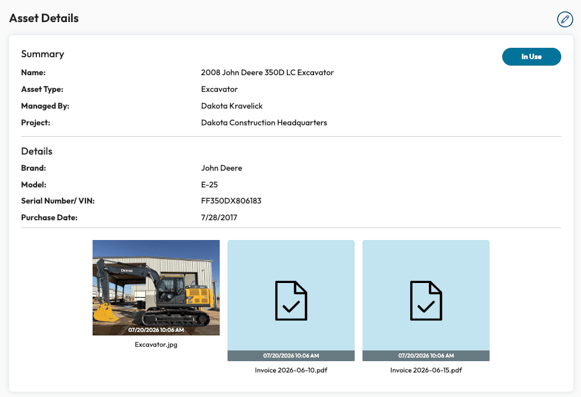
File names and upload dates now appear prominently for admins directly on thumbnails across Assets, Tasks, Certifications, Project Notes, and Timecards. Names can also be edited from the item's edit screen as well.
No guesswork on which files to open to find what you're looking for.
Timekeeping: Auto-lunch deductions on short shifts
Accurate lunch deductions, even across multiple short timecards.
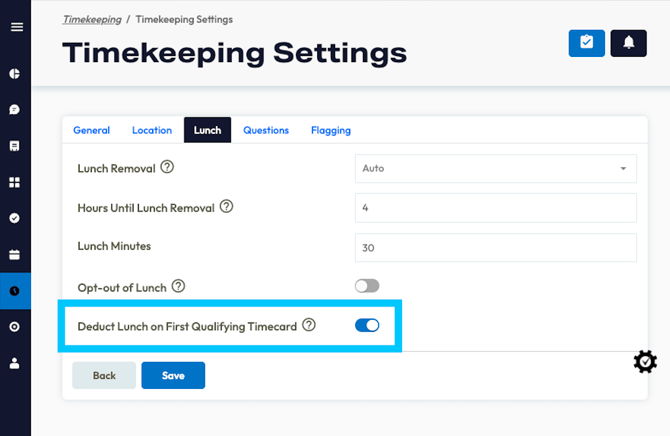
For workers with short shifts across sites or cost codes in a single day, lunch can now be deducted automatically from the first timecard that triggers the threshold.
Fewer manual adjustments for complex timekeeping needs.
This can be configured from Lunch options in Timekeeping Settings. When enabled, lunch will be automatically deducted from the first timecard whose cumulative hours for the day meet or exceed the lunch threshold. This setting requires auto lunch deduction to be on and opt-out of lunch to be disabled.
Additional Enhancements & Fixes
Forms:
- Resolved an issue where some filled form values were visible in the form preview but failed to appear in the downloaded PDF version.
- Resolved an issue where deleted GC-shared forms left "ghost" template names in the "All Forms" filter dropdown, making it appear as if forms from those templates still existed.
- Fixed an issue in the Corfix template builder where the "Dropdown Component" was incorrectly listed twice.
Mobile:
- Optimized form and asset loading on mobile, improving performance.
- Improved the first-time login experience by adding a loading indicator during the password change and login process, and disabling the login button to prevent multiple concurrent login attempts.
- Fixed an issue on mobile where searching for assets by number or description would result in a blank list instead of filtering to display the correct asset.
- Addressed an issue where workers occasionally encountered a "Form data is missing" error when attempting to sign "filled by both" forms on Corfix Mobile, preventing successful signing.
- Resolved an issue preventing PDF forms from loading and displaying correctly in the Corfix Mobile app on Apple devices, though they were viewable on Android and Web.
- Fixed a bug where adding a signature to a form created in offline mode on mobile would fail.
- Resolved an issue in Corfix Mobile's offline mode where reselecting a different template during form creation would incorrectly display the previously selected template's form instead of the new one.
- Fixed a problem in Corfix Mobile where the template list could appear empty if a user lacked permissions for the first alphabetically sorted templates, even when other accessible templates were available further down the list.
- Corrected the sorting of form templates in Mobile's online mode to be case-insensitive and numeric-aware, matching the existing offline mode behavior for a consistent user experience.
- Fixed an intermittent issue on Corfix Mobile where "filled by both" forms occasionally failed to sign, returning a "Form data is missing" error, especially under high network latency conditions.
- Resolved an issue where adding a signature in offline mode on Corfix Mobile failed, preventing form creation and displaying an empty signature modal.
Platform:
- Fixed an issue where "Other Contacts" for projects would fail to save silently if required fields like First Name or Last Name were left blank, incorrectly redirecting without saving data.
- Implemented a static, non-dismissable disclaimer that is now displayed beneath all Corfix Assist AI-generated responses across the platform, including email notifications and web form summaries.
- Resolved an issue where clearing a pending email from an account did not also clear the associated username, leading to the email being incorrectly marked as "already in use" and blocking its reuse.
- Corrected a bug where activating certain accounts with a pending email would leave them without a username, preventing proper user creation and welcome email delivery.
- Corrected issues preventing new workers from signing in with temporary passwords from system verification emails.
- Addressed an issue where Kiosk accounts could not be promoted to full accounts with login capabilities because the system blocked adding an email.
- Fixed a bug that caused worker imports to stall when attempting to import workers without an email address, resolving the "Invalid email address" validation error.
- Corrected an issue where clicking an email notification for a different company while logged into a blocked account failed to redirect the user to the login screen.
Projects:
- Added a Date Completed field for Projects, allowing administrators to track and report on project completion dates.
PDFs:
-
- Corrected the alignment of text areas within data grids in downloaded form PDFs; text is now left-aligned instead of centered.
- Fixed an issue which prevented PDF generation for some forms. Affected forms have been re-generated.
- Fixed an issue where the selected value (bubble indicator) for survey components was not rendering in downloaded PDF forms from Corfix Admin, although it appeared correctly in the form preview.
Notifications:
- Fixed an issue where companies were receiving duplicate notifications from Scheduling.
Assets:
-
Corrected an issue where, during asset creation or editing on mobile and web, data entered for one asset type would incorrectly persist after switching to another asset type that didn't have that field enabled.
Timekeeping:
- Addressed a timecard issue where, with punch-in/out rounding enabled, short duration shifts (especially after switching projects) could result in an adjusted end time earlier than the start time, leading to 0 hours recorded.
- Resolved a looping issue in Kiosk Mode Mobile Timekeeping where workers attempting to sign an incomplete form during punch-in would be repeatedly returned to the signature prompt after submission.
Coming Soon ...
Curious about what we're working on next? Here's a taste of some of the functionality we have in the works!
Be on the look out for the following in a future release:
Binder Folder QR Codes
One QR code, with your files always up to date.
Generate a single QR code for an entire binder folder instead of one per file. Scanning it pulls every resource in that folder in real time, so it always reflects the folder's current contents.
No more reprinting or regenerating a code every time documents change.
Schedule Conflict Warnings & More Filters
Find who's available and catch schedule conflicts before they happen.
Get flagged the moment you try to double-book a worker via drag-and-drop, with a clear confirm-or-cancel choice and a indicator on any day with an unresolved conflict. You can also filter the Worker and Asset Bench by specific days of the week to instantly see who's open, without checking schedules one by one.
More Obvious Required Fields
Faster forms. Fewer mistakes. Required fields on forms display a bold, red REQUIRED badge in place of a small red asterisk.
Workers can spot what they still need to complete at a mile away, cutting down on missed fields and rework.
Want to share your feedback? Reach out to the Corfix team -- we're always looking for feedback on how we can continue to improve!