.png?width=300&height=77&name=black-logo%20(1).png)
Automatic Corrective Actions
From form submission to resolved issue, automatically.
In this release, you can now speed up resolution by eliminating all the extra steps in between.
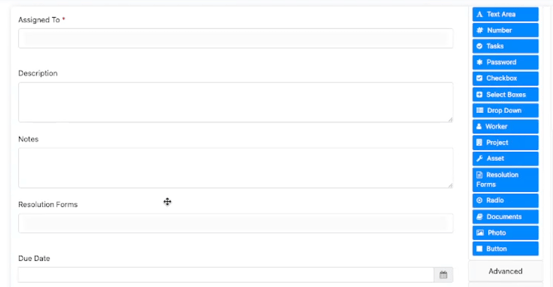
When a worker submits a form flagged that needs action, Corfix can automatically generate a follow-up task with the description, assignee, resolution form, and due date already set. No manual handoff required. The right people get the right action items the moment a problem is reported.
Likewise, for any form that should trigger subsequent follow up or future forms at a later date, the updated task component in Templates can now be made available for workers to fill in, or be auto-populated for them.
Multiple Pay Rates
Track time accurately, even when workers wear multiple hats.
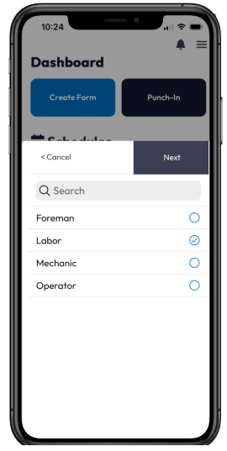
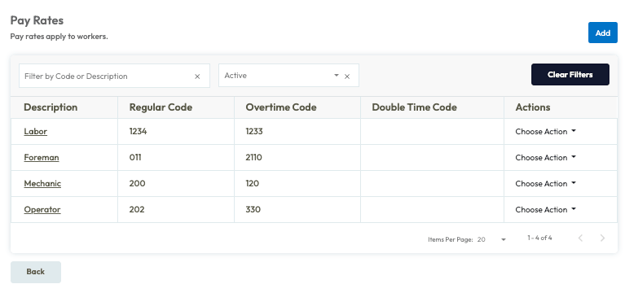
Workers can now be assigned several pay rates based on the roles they perform. When clocking in or creating a timecard, workers will be able to select which rate is applicable for that shift.
This ensures time is tracked and paid for the appropriate type of work, making timekeeping records and compensation accurate without extra manual adjustments.
Pay rates can be configured from the "Manage Pay Rates" page in Timekeeping Settings.
Once Pay Rates are configured, they can be added to each worker's profile. Workers with multiple pay rates will be able to select the appropriate rate when punching in or adding time cards.

AI Form Summaries with Corfix Assist
Get an AI-powered overview of your completed forms at a glance.
Corfix Assist can generate AI-powered summaries at the top of each completed form. Get the key details without scrolling through every single field, saving time for everyone who reviews forms.
This can be enabled via a new setting in Template options.
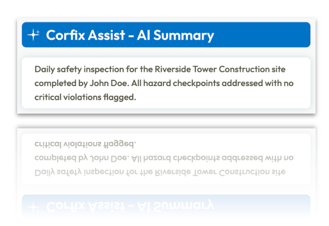
This can be enabled via a new setting in Template options.
More Integrations Available with Corfix Connect
Imagine having one source of truth across your systems -- total sync of your data.
You can now sync Corfix data seamlessly to even more platforms. This includes HR, payroll, ERP, LMS, compliance and reporting tools, making Corfix the central nervous system for your business.
New integrations added include:
Learn more about Corfix Connect here, and reach out to your CSM to see what we can automate for you!
Additional Enhancements & Fixes
-
Forms:
- Resolved an issue where scheduled forms set with "Monthly Day" recurrence were incorrectly calculating future due dates, leading to forms being scheduled on unintended days of the month. The system now correctly persists forms on the intended day of the month.
- Enhanced form versioning to now accurately track and display changes made to checkboxes, radio buttons, and dropdown selections, in addition to text changes.
- Closed a loophole that allowed workers to create new forms from inactive templates by copying old forms. The "Create A Copy" option will no longer appear for forms based on inactive templates.
- Eliminated the "[object Object]" display in dropdown lists within the Automated Tasks section of Admin Templates, now showing correct values.
-
Notifications:
- Fixed an issue where auto-emailing of completed forms failed if the template had optional signers and no signers were assigned. Forms will now correctly send emails upon completion, even without assigned signers.
Mobile:
- Fixed an issue where punching in on mobile with multiple outstanding scheduled forms would cause the signature stage to freeze, preventing completion of the punch-in.
- Addressed an issue where the Select Box Modal in forms was unresponsive or caused app crashes on iPads running iOS 26.4.
- Corrected a display issue on the mobile dashboard where the refresh icon appeared misaligned and overlapped other action buttons.
- Resolved an issue where forms on the mobile app would scroll horizontally due to long placeholder text in components, ensuring proper text containment.
- Fixed an issue preventing users from copying text from text area fields in completed forms on the mobile app.
- Addressed an issue where the "Copy Link" button failed to copy the QR code link to the clipboard when sharing forms on mobile.
- Implemented alphabetical sorting for certification types when filtering and creating new certifications on the mobile app.
- Fixed an issue where the time selector for timecards on Android devices would auto-scroll incorrectly when larger font sizes were enabled.
- Ensured the "Preview PDF" button is no longer visible for forms when the mobile app is offline, preventing inaccessible actions.
- Fixed an issue where workers created on the mobile app were not being correctly associated with their selected groups, ensuring accurate group membership.
- Kiosk:
- Resolved an issue in Kiosk Mode where rapid punch-in/punch-out actions on mobile would lead to a soft-lock and incorrect page navigation, ensuring smoother timekeeping flows.
- PDFs:
-
- Resolved an issue where colors associated with flagged components were missing from generated form PDFs.
- Corrected an issue preventing the generation and download of certain form PDFs, which previously resulted in a "file not found" error.
- Fixed an issue where date fields were not displaying on generated PDFs if their internal API property name was set to "day."
- Addressed an issue where forms generated from binder resources with a large number of assigned signers displayed duplicated signatures on the PDF export.
- Resolved an issue in form exports where photo component labels appeared on separate pages from their corresponding images, leading to blank pages. Labels and photos will now render together.
- Corrected a bug where custom HTML components, such as matrix tables with color coding, were not displaying their colors properly on generated form PDFs.
- Fixed a bug where form PDFs did not retain the inline layout defined in the template, resulting in components being stacked vertically instead of side-by-side.
- Integrations:
- Resolved an issue where Acumatica integration syncs were incorrectly reactivating "Completed" projects by ensuring project status is maintained unless explicitly updated in the sync payload.
- Timekeeping:
-
- Corrected an issue in timecard details where the total hours summary row incorrectly rounded minutes, now displaying the exact sum of timecard hours and minutes.
- Resolved an issue where adding timecards for a worker without a pay rate displayed duplicate start/end time entries and allowed saving. The system now correctly shows a single entry and disables the save button until a pay rate is assigned.
- Administrators can now configure timekeeping settings to include "Pay Rate" as a prompt option for punch clock operations, allowing workers to select a specific pay rate when switching projects or punching in/out.
- Fixed a mobile timekeeping issue where delayed punch-out saves resulted in GPS/timestamp mismatches.
Coming Soon ...
Curious about what we're working on next? Here's just a taste of some of the functionality we have in the works! Be on the look out for the following in a future release:
Corfix Assist in your inbox!
Get an AI-powered summary before you even open the form.
Corfix Assist includes an AI-generated summary directly in the body of form notification emails. When a form is submitted, recipients get the key details right in their inbox, without needing to open the form at all.
Whether you're a supervisor reviewing daily inspections or a safety lead tracking incident reports, the summary gives you what you need at a glance and lets you decide when a closer look is actually necessary.
Scheduling Redesign
A cleaner, faster way to build your weekly schedule.
A cleaner layout, simplified interactions, and richer project-level context at a glance. Admins can now click directly on cards to edit, use inline delete controls to clear rows or individual assignments, and see resource allocation status per project — color-coded green, orange, red, or grey.
Worker and asset counts, project addresses, and status indicators are all better surfaced directly in the view, reducing the need to drill in for basic information.
More Reporting Coverage
Admins can select even more data columns and apply filters for more fields than ever before. More detailed reporting possibilities across Projects, Tasks, Workers, Time Cards, and Certifications.
Want to share your feedback? Reach out to the Corfix team -- we're always looking for feedback on how we can continue to improve!