.png?width=300&height=77&name=black-logo%20(1).png)
You have successfully logged in and don't know where to start? No problem!
This Dashboard is your company view at a high level. The 4 cards at the top will act as cues for your organization. They will update in real time to give you the information you need right on one screen.
- Live Projects: This is triggered when a Form is created under a Project.
Forms created = Live Projects. - Headcount:
Worker headcount is tracked based on your active tools:
-
Standard/Time Cards (Timekeeping Add-On): A worker is active if they have at least one signature for the day.
-
Punch Clock (Timekeeping Add-on): Headcount is determined by at least 1 punch in for the day.
-
- Today's Forms: The number will represent how many Forms have been created and the colour (Green or Red) will represent the status (Complete or Incomplete).
- Incomplete Tasks: The number represents incomplete tasks. If the number is above 0, then it is red.
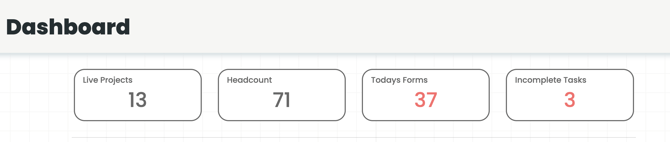
All of the above are clickable, meaning you can click on them and they will bring you to the associated tab (Projects, Workers, Forms, and Tasks).
Green/Yellow/Red is used throughout Corfix. This colour scheme indicates if actions are complete, a review needs to be done, or action needs to be taken, respectively.